Tag: wekan

  • Transfer Trello to Wekan with LDAP

    My use case is Transfer from Trello to Wekan, and need use MS AD auth to manage accounts.

    I test the following wekan versions on snap (latest version on 2024/03/18):

    1. Stable: 6.09

    2. Candidate: 7.41

    3. Beta: 6.77

    Transfer Trello to Wekan

    I set original board visiable setting to public. Add new board by import JSON that export from Trello, and tested more than three times.

    1. All wekan versions cannot import attachments.

    2. Version 6.77 and version 7.41 cannot transfer all cards to wekan.

    3. It will not redirect to imported baord after press [完成] or the [Done] button. IMPORTANT! PRESS BUTTON ONLY ONE TIME!!! I press [Done] button lots of times and made lots of duplicate board …

    LDAP Authentication

    The AD server I use is Windows 2012 R2. But there are lots of factors let ldap function work or not. And this is just my experience in my environment.

    1. I cannot bind to my AD server, and I cannot use any data sync function, either.

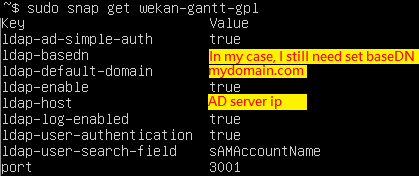
    2. The only way I can use is Ldap-AD-Simple-Auth. It works well.

    3. It need set Admin permission to Password Auth Account and LDAP Auth Account. If not, The default login auth method will not work when enable the hiding option.

    In the mean time, the version I suggest is 6.09. It’s really more stabled than other version in my case.

  • About 關於 Snap(Snapcraft)

    Ubuntu 的 snap 是一種應用程式包管理系統,它允許開發者和用戶更容易地分發和安裝應用程式。snap 包含了應用程式和它們運行所需的所有依賴項,這樣可以在不同的 Linux 發行版上無縫運行。

    Snap 版本分為幾個不同的通道,反映了不同的穩定性和開發階段:

    • stable: 最穩定的版本,適合所有用戶使用。如:sudo snap install wekan
    • candidate: 候選版本,通常是接近穩定的,但可能還需要進一步測試。如:sudo snap install wekan –candidate
    • beta: 測試版本,包含了即將發布的新功能,但可能還不夠穩定。如:sudo snap install wekan –beta
    • edge: 最前沿的版本,通常是開發中的版本,可能包含未完成的特性或較多錯誤。如:sudo snap install wekan –edge

    通常情況下,開發者會先在 edge 通道發布最新的更改,然後隨著問題的解決,逐步推送到 beta、candidate,最後是 stable 通道。這樣用戶可以根據自己願意承擔的風險程度選擇安裝不同通道的版本

    MUbuntu’s snap is an application packaging system that allows developers and users to distribute and install applications more easily. Snap packages contain the application and all its dependencies, ensuring it can run seamlessly across different Linux distributions.

    Snap versions are divided into several channels, reflecting different levels of stability and development stages:

    • stable: The most stable version, suitable for all users. Ex: sudo snap install wekan
    • candidate: A release candidate version, usually close to stable but may require further testing. Ex: sudo snap install wekan –candidate
    • beta: A beta version that includes upcoming features but might not be stable enough. Ex: sudo snap install wekan –beta
    • edge: The cutting-edge version, often in development, which may include incomplete features or more errors. Ex: sudo snap install wekan –edge

    Typically, developers release the latest changes in the edge channel first, and as issues are resolved, they progressively push updates to the beta, candidate, and finally the stable channel. This allows users to choose which version to install based on the level of risk they are willing to take.

  • 免費的卡片式看板管理軟體 Wekan

    免費的卡片式看板管理軟體 Wekan

    超過2000多人萬使用的Trello看板服務,又要增加對免費用戶的限制了。上次限制工作區的看板數量,還可以透過內容分類的方式拆分工作區;這次限制工作區成員人數10人,就讓原本多人免費使用的情境,不得不改成付費了…

    當然,除了老實付費或是移轉至其他服務平台外,也可以自行架設開源的看板軟體。而自行架設開源(免費)看板服務的方案,對於使用人數多的組織來說,是頗具吸引力的做法。

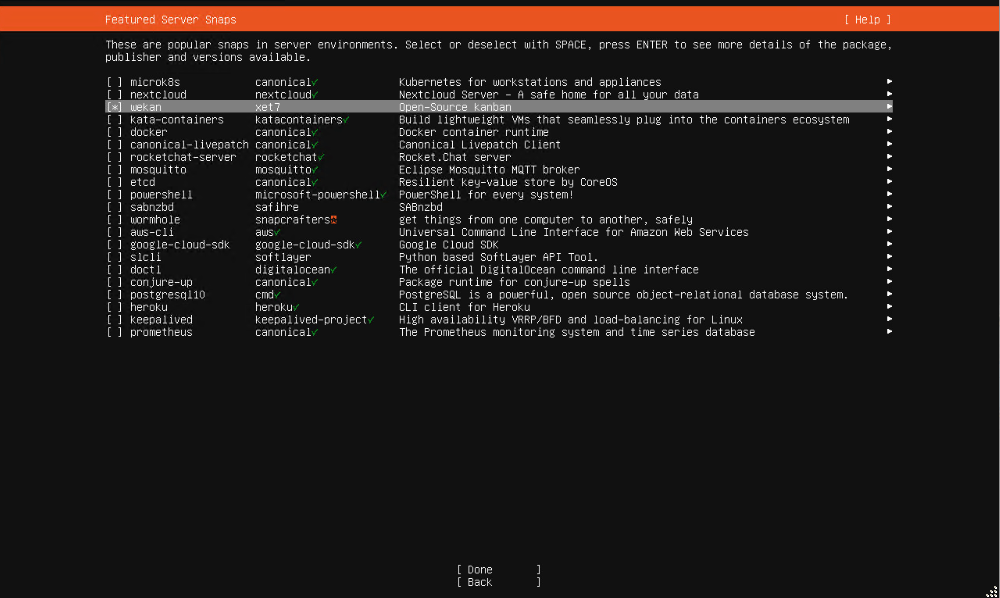
    免費的看板管理軟體,首推持續穩定發展的 Wekan。不僅使用介面和 Trello 相近,也多了一些原本 Trello 需要訂閱才能開啟的功能。佈署上也十分容易,uBuntu Server 22.04 安裝時就可以直接選用安裝!

    Wekan 基本設定

    snap set wekan mongodb-bind-ip="0.0.0.0"   #Allow IP access, here allows anyone to access.
    snap set wekan root-url='http://192.168.1.7' # Set the access address URL, change it to your device’s IP.
    snap set wekan port='80' #Set the external access port.
    snap set wekan mail-url='smtp://username:password@smtp.mailserver.com.tw:465
    snap set wekan mail-from='brassaikao@outlook.com'

    LDAP 設定

    sudo snap set wekan ldap-enable='true'
    sudo snap set wekan default-authentication-method='ldap'
    sudo snap set wekan ldap-port='389'
    sudo snap set wekan ldap-host='192.168.1.1' #AD Server
    sudo snap set wekan ldap-basedn='OU=domain users,DC=test,DC=com' #AD Structure
    sudo snap set wekan ldap-login-fallback='false'
    sudo snap set wekan ldap-reconnect='true'
    sudo snap set wekan ldap-timeout='10000'
    sudo snap set wekan ldap-idle-timeout='10000'
    sudo snap set wekan ldap-connect-timeout='10000'
    sudo snap set wekan ldap-authentication='true'
    sudo snap set wekan ldap-authentication-userdn='CN=user,OU=test,OU=domain users,DC=test,DC=com' #AD user structure as full level
    sudo snap set wekan ldap-authentication-password='password' #AD auth password
    sudo snap set wekan ldap-log-enabled='true'
    sudo snap set wekan ldap-background-sync='true'
    sudo snap set wekan ldap-background-sync-interval='every 1 minute'
    sudo snap set wekan ldap-background-sync-keep-existant-users-updated='true'
    sudo snap set wekan ldap-background-sync-import-new-users='true'
    sudo snap set wekan ldap-encryption='false'
    sudo snap set wekan ldap-user-search-field='sAMAccountName'
    sudo snap set wekan ldap-username-field='sAMAccountName'
    sudo snap set wekan ldap-fullname-field='tw'

    LDAP AD Simple Auth (親測推薦👍)