
An OAuth sample code base on Django.
Django Commands
- pip3 install django djangorestframework django-oauth-toolkit
- django-admin startproject oauth_test
- cd oauth_test
- python3 manage.py startapp test_app
- python3 manage.py makemigrations
- python3 manage.py migrate
- python3 manage.py createsuperuser
- python3 manage.py runserver
- We can test by using Postman application.
Setup OAuth in project’s admin management site
- Default site url: http://127.0.0.1:8000/admin
- Attention! The Client secret need save copy on create step! After creating, the Client secret field only shows the hashed client secret not original. (We need use the original client secret for auth)

Project Structure

.\oauth_test\settings.py
# Application definition

INSTALLED_APPS = [
    'django.contrib.admin',
    'django.contrib.auth',
    'django.contrib.contenttypes',
    'django.contrib.sessions',
    'django.contrib.messages',
    'django.contrib.staticfiles',
    'rest_framework',
    'oauth2_provider',
    'test_app',
]
.\oauth_test\urls.py
from django.contrib import admin
from django.urls import path, include

urlpatterns = [
    path('admin/', admin.site.urls),
    path('o/', include('oauth2_provider.urls', namespace='oauth2_provider')),
    path('', include('test_app.urls')),
]
.\test_app\apps.py
from django.apps import AppConfig


class TestAppConfig(AppConfig):
    default_auto_field = 'django.db.models.BigAutoField'
    name = 'test_app'

    print("class MyAppConfig(AppConfig): test_app")  # 或使用 logging


    def ready(self):
        from .models import Item  # 確保導入了 Item 模型

        print("Load test data")  # 或使用 logging
        if not Item.objects.filter(name="測試物品 1").exists():
            Item.objects.create(name="測試物品 1", description="這是一個測試物品", price=100.00, available=True)
        if not Item.objects.filter(name="測試物品 2").exists():
            Item.objects.create(name="測試物品 2", description="這是一個測試物品", price=200.00, available=False)
.\test_app\models.py
from django.db import models
from django.contrib.auth.models import User

class Item(models.Model):
    name = models.CharField(max_length=100)
    description = models.TextField()
    price = models.DecimalField(max_digits=10, decimal_places=2)
    available = models.BooleanField(default=True)

    def __str__(self):
        return self.name
.\test_app\serializers.py
from rest_framework import serializers
from .models import Item

class ItemSerializer(serializers.ModelSerializer):
    class Meta:
        model = Item
        fields = ['id', 'name', 'description', 'price', 'available']
.\test_app\views.py
from django.shortcuts import render

from rest_framework.views import APIView
from rest_framework.response import Response
from rest_framework.permissions import IsAuthenticated
from .models import Item
from .serializers import ItemSerializer

class ItemDetailView(APIView):
    permission_classes = [IsAuthenticated]

    def get(self, request, item_id):
        try:
            item = Item.objects.get(id=item_id)
        except Item.DoesNotExist:
            return Response({'error': 'Item not found'}, status=404)

        serializer = ItemSerializer(item)
        return Response(serializer.data)
.\test_app\urls.py
from django.urls import path
from .views import ItemDetailView

urlpatterns = [
    path('v1/items/<int:item_id>/', ItemDetailView.as_view(), name='item-detail'),
]
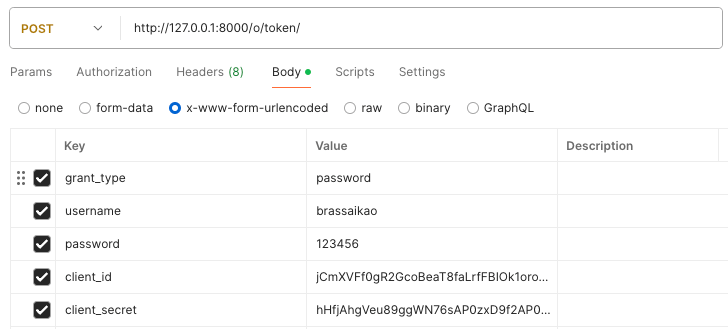
Postman Test for get auth – Post
Use the original Client secret.
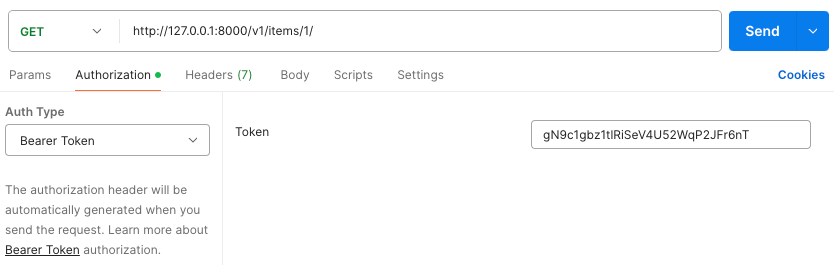
Postman Test for use auth – Get
 Brassai Kao’s Tech Weave