
Category: Tech

IT Technology, 3C, AI

  • C# – 本機報表列印後程式失焦的解決方案(讓當前程式獲取焦點)

    最近在開發本機report列印程式時,碰到列印後程式就會失焦的狀況,試了很多參數還是無法排除現象。目前先用重新取得焦點的方式處理,程式段如下:

    using System.Runtime.InteropServices;

    public static class NativeMethods
    {
    [DllImport(“user32.dll”)]
    internal static extern IntPtr SetForegroundWindow(IntPtr hWnd);

    [DllImport(“user32.dll”)]
    internal static extern bool ShowWindow(IntPtr hWnd, int nCmdShow);

    public static void FocusApplication()
    {
    Process currentProcess = Process.GetCurrentProcess();
    IntPtr hWnd = currentProcess.MainWindowHandle;
    if (hWnd != IntPtr.Zero)
    {
    SetForegroundWindow(hWnd);
    ShowWindow(hWnd, (int)User32.SW_MAXIMIZE);
    }
    }

    private enum User32
    {
    SW_FORCEMINIMIZE = 11,
    SW_HIDE = 0,
    SW_MAXIMIZE = 3,
    SW_MINIMIZE = 6,
    SW_RESTORE = 9,
    SW_SHOW = 5,
    SW_SHOWDEFAULT = 10,
    SW_SHOWMAXIMIZED = 3,
    SW_SHOWMINIMIZED = 2,
    SW_SHOWMINNOACTIVE = 7,
    SW_SHOWNA = 8,
    SW_SHOWNOACTIVATE = 4,
    SW_SHOWNORMAL = 1,
    }
    }
  • SSRS – DateAdd函數的參數定義與.NET不同!

    在處理印度時區(+5.5)時發現的差異!

    SSRS – DateAdd(datepart, Integer, date)

    .Net – DateAdd(datepart, Double, date)

  • .NET – user.config 存放的位置

    C:\Users\{USERNAME}\AppData\Local\{PROGRAM NAME}\ …

  • Thunderbird Mail 備份及還原

    Backup 備份

    1. 關閉 Thunderbird Mail
    2. 檔案總管瀏覽到 %APPDATA%\Thunderbird\Profiles\
    3. 複製 *******.default-release 資料夾到要存放的位置即可

    Restore 還原

    1. 關閉 Thunderbird Mail
    2. 檔案總管瀏覽到 %APPDATA%\Thunderbird\Profiles\
    3. 將備份資料d夾內所有資料覆蓋貼上到 *******.default-release 即可
  • Error 404 When MVC Website Deploy on IIS 7.5

    Please check 應用程式集區 Application Pool is in .Net 4 Integration mode.

  • FortiGate 初始相關設定

    Console 連線參數

    • Baud rate: 9600 bps
    • Data bit: 8 bit
    • Parity bit: None
    • Stop bit: 1 bit

    Reset 出廠設定

    • 登入Web GUI介面操作
    • 登入console輸入指令: exec factoryreset

    Reset Admin Password

    重設管理者密碼不會動到其他設定,具體方式如下:

    1. 以console方式連接設備
    2. 重啟設備
    3. 開到 console 畫面的1分鐘內輸入下列資訊:
      • login: maintainer
      • password: bcpbFTGTxxxxxxxxxx (此為設備的S/N序號)
    4. 成功登入後輸入下列指令:
      1. config system admin
      2. edit admin
      3. set password {新設定的密碼}
      4. end

    Default Connection Info

    • 預設LAN為DHCP (default IP: 192.168.1.99)
    • 登入帳號及密碼: admin / [space]
  • Aras Innovator – Server Method for Client

    /*
    Use parameters that send from other method and Aras PLM permission to query the sql server.
    */

    var inn = this.getInnovator();
    var classification = this.getPropertyAttribute("Item","classification");
    var item_number = this.getPropertyAttribute("Item","item_number");

    Aras.Server.Security.Identity plmIdentity = Aras.Server.Security.Identity.GetByName("Aras PLM");
    bool permissionWasSet = Aras.Server.Security.Permissions.GrantIdentity(plmIdentity);
    try {
    var callframe = inn.newItem("SQL", "SQL PROCESS");
    callframe.setProperty("name", "GetLatestVersion");
    callframe.setProperty("PROCESS", "CALL");
    callframe.setProperty("ARG1", classification);
    callframe.setProperty("ARG2", item_number);
    callframe.setProperty("ARG3", year);
    var specialNumber = callframe.apply();
    return specialNumber;
    }
    finally {
    if (permissionWasSet) {
    Aras.Server.Security.Permissions.RevokeIdentity(plmIdentity);
    }
    }

  • Aras Innovator – Client Side Call Server Method

    /*
    Use server side method to solve sql query issue that client side method do not have permission.
    (Server side method could use Aras.Server.Security to grant Aras PLM permission)
    */

    // Create server side method query
    var queryDOM = top.aras.createXMLDocument();

    queryDOM.loadXML("<Item/>");
    queryDOM.documentElement.setAttribute("classification", classification.value);
    queryDOM.documentElement.setAttribute("item_number", item_number.value);
    var returnXML = top.aras.applyMethod("GetLatestVersion", queryDOM.xml);

    // Parse return xml data
    var docReturn = top.aras.createXMLDocument();

    docReturn.loadXML(specialNumber);
    var partMajorRev = docReturn.selectSingleNode("Item/major_rev").text;
    var partGeneration = docReturn.selectSingleNode("Item/generation").text;

    alert(partMajorRev + partGeneration);
    
    
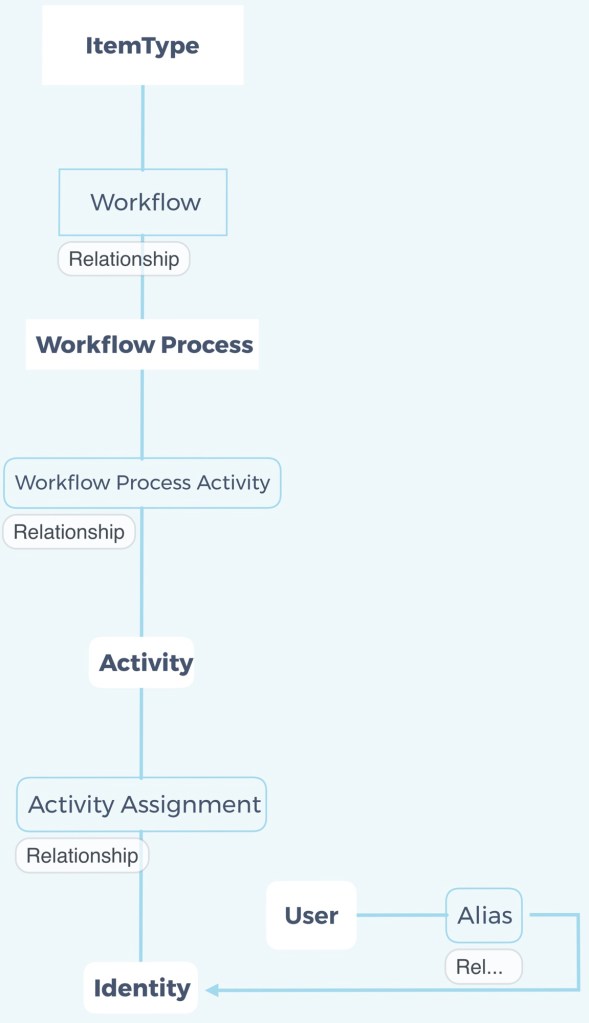
  • Aras Innovator – 表單流程簽核架構

    ItemType—>Workflow—>Workflow Process—>Workflow Process Activity—>Activity—>Activity Assignment—>Identity