
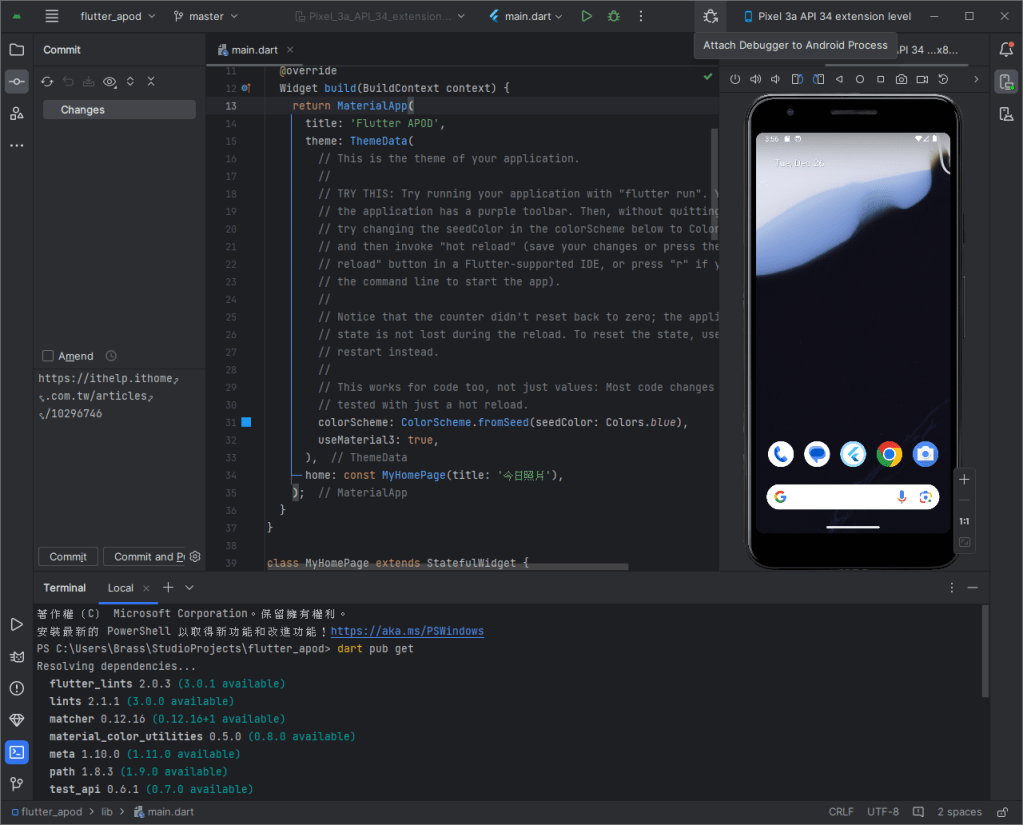
在 命令提示字元、Android Studio 或 VSCode 的終端機介面,輸入以下指令即可:
- 切換到專案所在目錄
- 取得當前專案目錄底下的相關資訊:dart pub get
- 確保沒有錯誤:dart analyze
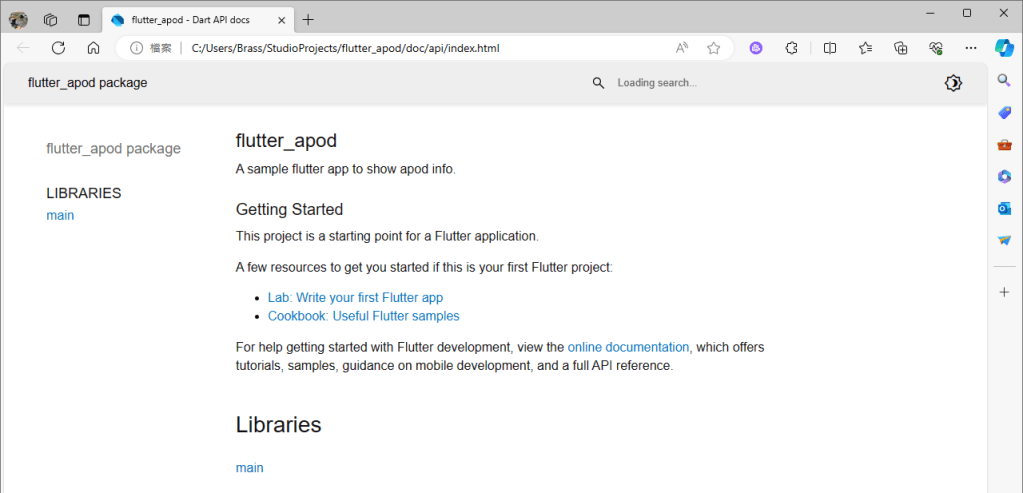
- 產生API文件到專案所在目錄的 ./doc 資料夾中:dart doc .
IT Technology, 3C, AI
在 命令提示字元、Android Studio 或 VSCode 的終端機介面,輸入以下指令即可:

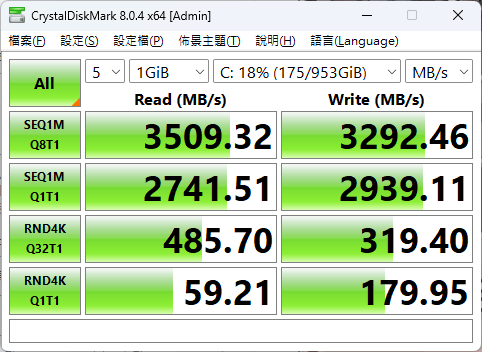
Crystal Disk Mark:https://crystalmark.info/en/software/crystaldiskmark/
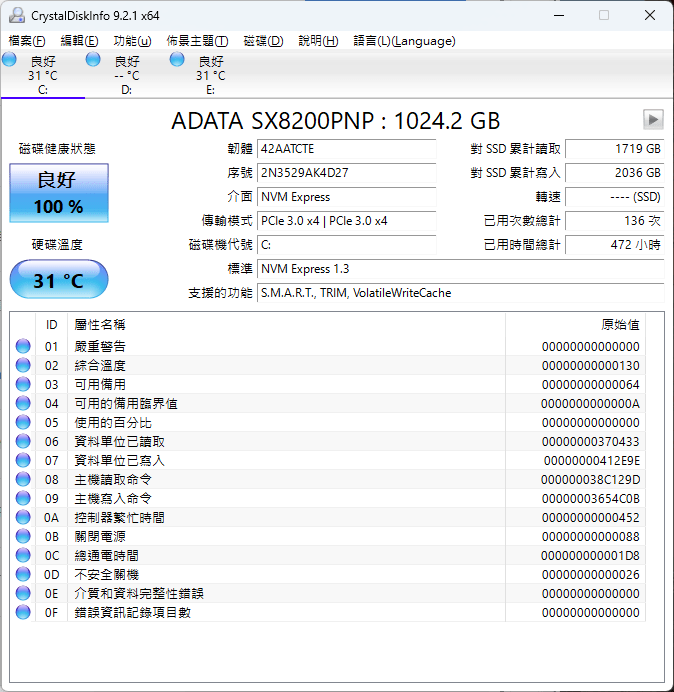
Crystal Disk Info:https://crystalmark.info/en/software/crystaldiskinfo/
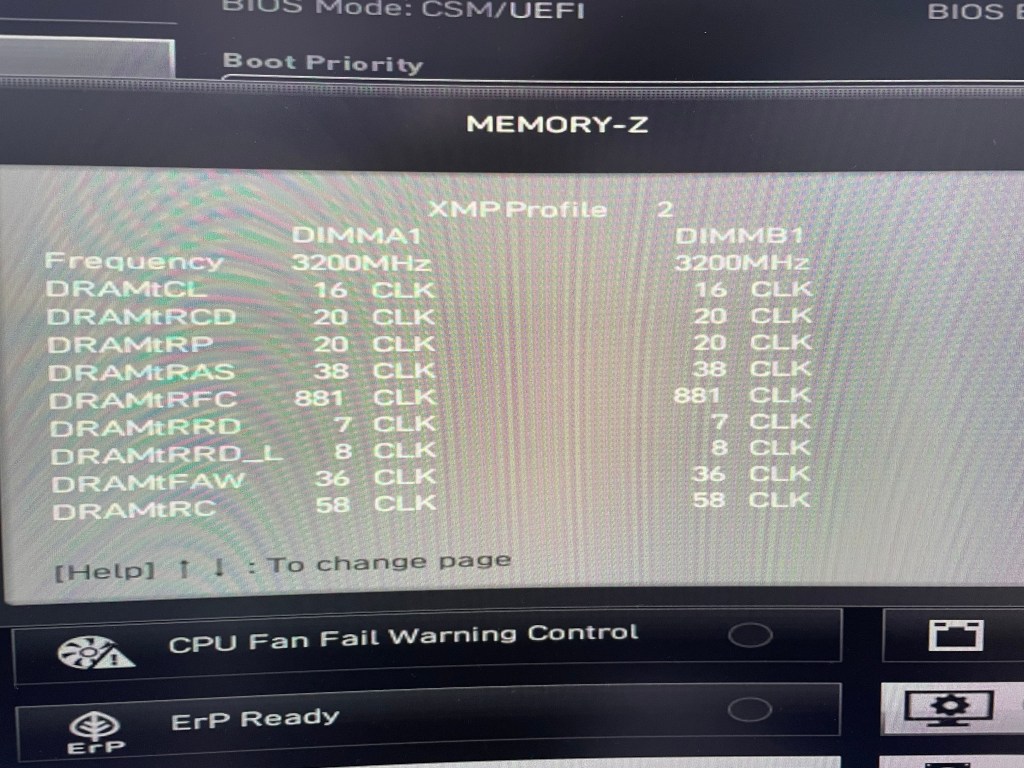
前陣子架設了 AMD 5600G 平台,當時配套的是DDR4 3600記憶體,但後來發現平台實際上只跑了DDR4 2666的速度。
經確認原來我用的這條記憶體的JEDEC標準時脈只到2666MHz,剩下的3200MHz和3600MHz是屬於Intel XMP設定。
雖然AMD平台可以透過各家主機板的快速超頻功能套用XMP設定,但我的MSI A520 主機板偏偏就只能套用3600MHz的設定,這已經超過AMD原廠支援的3200MHz了,若要符合,就必須手動處理:
1. 先確認記憶體的XMP設定內容。透過CPU-Z這套軟體可以查到XMP中包含時脈、電壓、主要CL延遲時間等對效能影響較大的參數,但若要看到細部的CL延遲時間,還是要藉由主機板BIOS提供的查詢功能。(底下是MSI的MEMORY-Z查詢畫面)
2. 套用最高的JEDEC標準時脈後,重啟電腦進入BIOS (確保調整的設定是建構在標準設定之上)
3. 再參考1.查到的參數一一設定後,重開機即可



實際上機樣貌2
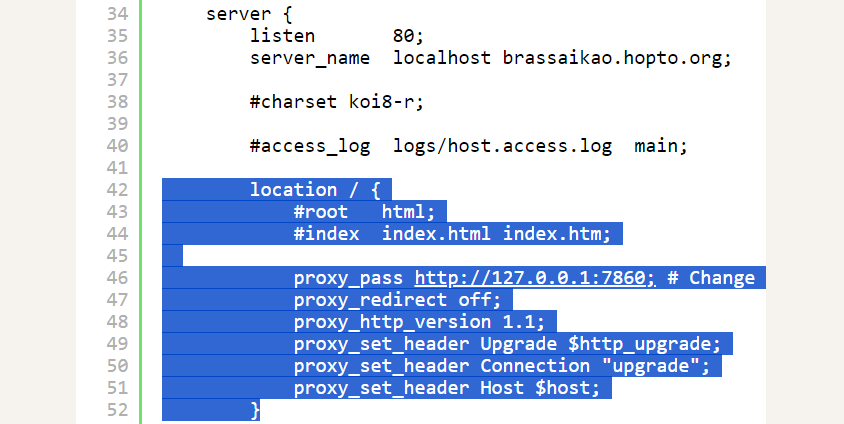
使用 AUTOMATIC1111 提供的 Stable Diffusion 方式時,如果有出現 connection errored out 並導致無法正常運作。通常是因為 proxy 導致。
以 Ngnix 為例,參考 Gradio 的指南設定 proxy 即可解決問題。
https://www.gradio.app/guides/running-gradio-on-your-web-server-with-nginx
#user  nobody;
worker_processes  1;

#error_log  logs/error.log;
#error_log  logs/error.log  notice;
#error_log  logs/error.log  info;

#pid        logs/nginx.pid;


events {
    worker_connections  1024;
}


http {
    include       mime.types;
    default_type  application/octet-stream;

    #log_format  main  '$remote_addr - $remote_user [$time_local] "$request" '
    #                  '$status $body_bytes_sent "$http_referer" '
    #                  '"$http_user_agent" "$http_x_forwarded_for"';

    #access_log  logs/access.log  main;

    sendfile        on;
    #tcp_nopush     on;

    #keepalive_timeout  0;
    keepalive_timeout  65;

    #gzip  on;

    server {
        listen       80;
        server_name  localhost brassaikao.hopto.org;

        #charset koi8-r;

        #access_log  logs/host.access.log  main;

        location / {
            #root   html;
            #index  index.html index.htm;

            proxy_pass http://127.0.0.1:7860; # Change this if your Gradio app running on a different port
            proxy_redirect off;
            proxy_http_version 1.1;
            proxy_set_header Upgrade $http_upgrade;
            proxy_set_header Connection "upgrade";
            proxy_set_header Host $host;
        }

        #error_page  404              /404.html;

        # redirect server error pages to the static page /50x.html
        #
        error_page   500 502 503 504  /50x.html;
        location = /50x.html {
            root   html;
        }

        # proxy the PHP scripts to Apache listening on 127.0.0.1:80
        #
        #location ~ \.php$ {
        #    proxy_pass   http://127.0.0.1;
        #}

        # pass the PHP scripts to FastCGI server listening on 127.0.0.1:9000
        #
        #location ~ \.php$ {
        #    root           html;
        #    fastcgi_pass   127.0.0.1:9000;
        #    fastcgi_index  index.php;
        #    fastcgi_param  SCRIPT_FILENAME  /scripts$fastcgi_script_name;
        #    include        fastcgi_params;
        #}

        # deny access to .htaccess files, if Apache's document root
        # concurs with nginx's one
        #
        #location ~ /\.ht {
        #    deny  all;
        #}
    }


    # another virtual host using mix of IP-, name-, and port-based configuration
    #
    #server {
    #    listen       8000;
    #    listen       somename:8080;
    #    server_name  somename  alias  another.alias;

    #    location / {
    #        root   html;
    #        index  index.html index.htm;
    #    }
    #}


    # HTTPS server
    #
    #server {
    #    listen       443 ssl;
    #    server_name  localhost;

    #    ssl_certificate      cert.pem;
    #    ssl_certificate_key  cert.key;

    #    ssl_session_cache    shared:SSL:1m;
    #    ssl_session_timeout  5m;

    #    ssl_ciphers  HIGH:!aNULL:!MD5;
    #    ssl_prefer_server_ciphers  on;

    #    location / {
    #        root   html;
    #        index  index.html index.htm;
    #    }
    #}
}
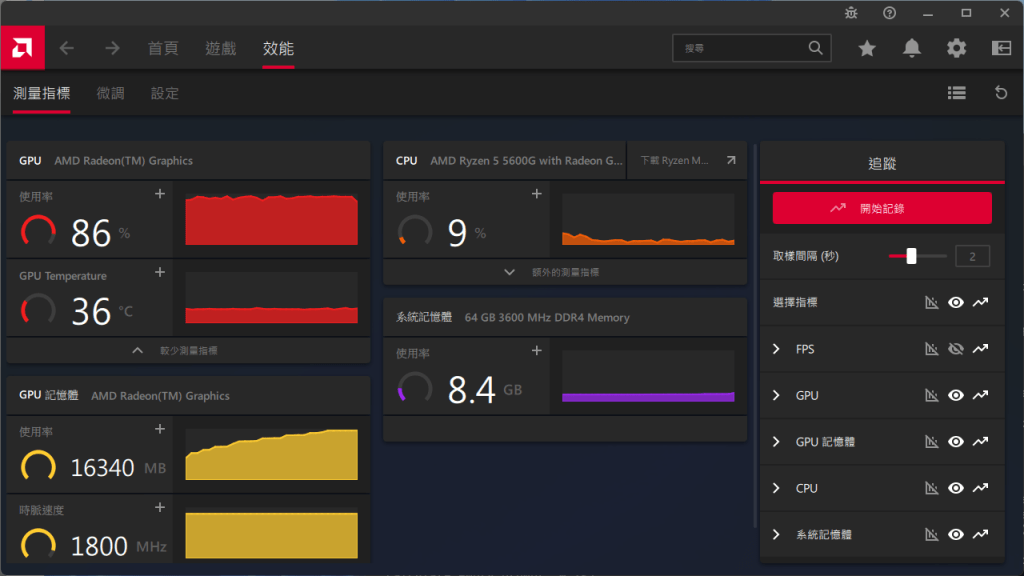
非 Nvidia 繪圖晶片可透過 DirectML 來使用 Stable Diffusion,缺點就是耗費記憶體。不過這對於CPU內建的繪圖晶片來說不是問題。直接在主機板設定把分享記憶體拉滿(16GB)即可。當然,內建的繪圖晶片也要堪用就是了。因此,幾經考量下,選用AMD 5600G配64GB DDR4 3600來搭建。


微軟提供的 DirectML(https://learn.microsoft.com/zh-tw/windows/ai/directml/dml) 技術,是基於 DirectX 12.0 建構的機器學習框架,原則上只要能支援DirectX 12.0的繪圖晶片就能運作。以 AMD 繪圖晶片為例,只要是GCN架構(Radeon HD 7000)之後(含)的都可以支援。
Stable Diffusion 使用的 PyTorth,是使用 nVidia 的 CUDA 語言控制運算資源。因此,才有了必須要 nVidia 顯示晶片才能運行的限制。好在目前已經有使用 DirectML 控制運算資源的 PyTorch with DirectML(https://pypi.org/search/?q=pytorch-directml)。再搭配網路大神們提供的 Stable Diffusion Web UI with DirectML(https://github.com/lshqqytiger/stable-diffusion-webui-directml),便能輕鬆實現運作。
Note: 目前 DirectML 的效能大約介於純用 CPU 運算和使用 CUDA 之間,若是重度需求,還是建議直接用 nVidia 繪圖晶片
使用 Python 首要注意的就是版本選擇。目前最新穩定的版本為 3.12.0,其中,大版本已維持多年,小版本則約半年到一年進行更新,主要著重於性能和安全性的提升。
若選擇使用的版本太新,往往一堆套件還無法支援,導致程式無法運作。在 2023/11/26 的當下,推薦使用 Python 3.11 是相對通行且套件支援度高又不會太舊的版本,如 Stable Diffusion 等 AI 應用需要的 PyTorch 套件尚不支援 Python 3.12。如果再保守一點可以選擇 Python 3.10,套件的支援度和穩定度會更高些。
同樣的,各套件可能也會限定其引用其他套件的版本,以避免版本更新,導致因不相容而無法運行。
補充:目前大部分 AI 相關的套件,仍使用 NVidia 繪圖晶片專屬的 CUDA 語言開發,故包含 Stable Diffusion 等應用都必須要有該硬體才能獲得最大效能。(用DirectML能跑但性能不及CUDA)
由於 Python 的套件眾多且對版本的卡控較為嚴檢,故會建立需求清單來管理程式運行所需要的套件,並透過虛擬環境的方式來指定使用的Python版本,並確保開發與最終部署環境的一致。以下以Windows的命令提示字元來進行操作:



 Brassai Kao’s Tech Weave