
Aras Innovator 系統並無提供使用者活動歷史紀錄的功能,但仍可透過以下方式取得使用者的活動紀錄:
- 在文件、料件等等各個ItemType項目的編輯、流程簽核紀錄
- Social 討論紀錄 (需付費訂閱成 Subscriber)
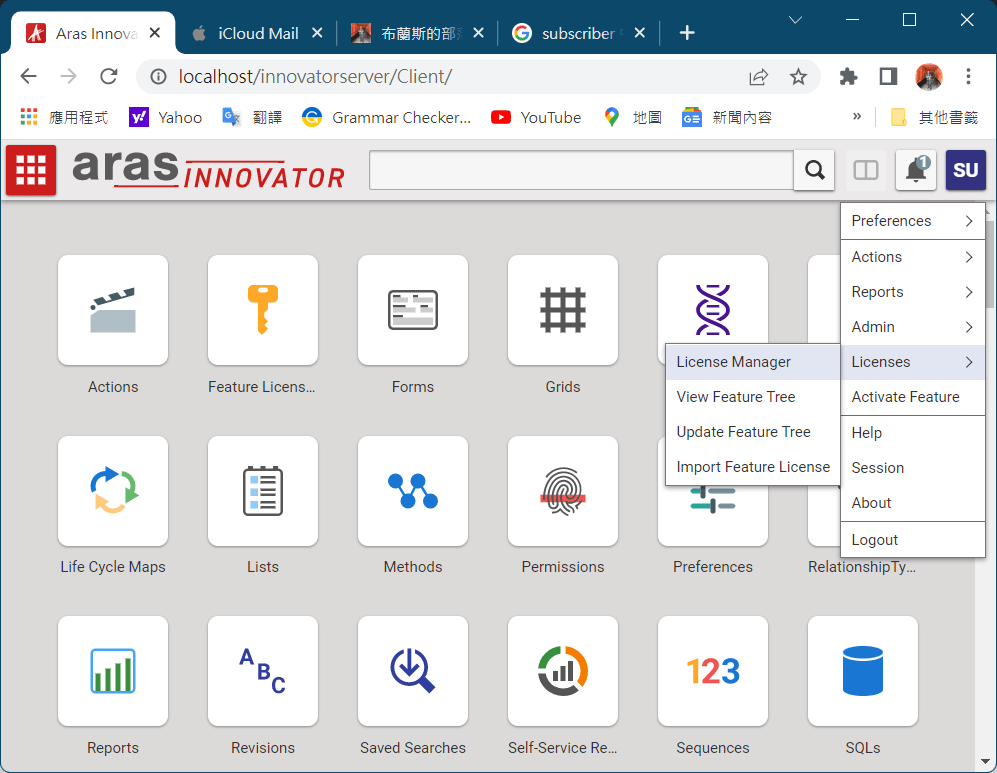
- 查詢當前在線使用者 (圖1)
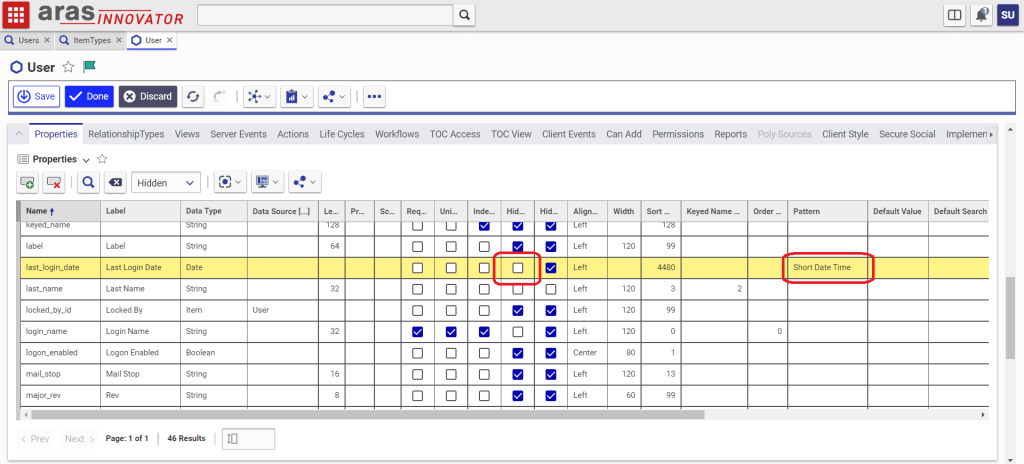
- 查詢個別使用者最後登入時間 (圖2、圖3)

Software that empowers product-driven organizations to embrace what makes them unique, to overcome challenge, and to seize opportunity.
Aras Innovator 系統並無提供使用者活動歷史紀錄的功能,但仍可透過以下方式取得使用者的活動紀錄:
若發生安裝完Aras Innovator後,出現IIS無法啟動的狀況,請參閱下圖修改IIS的applicationHost.config檔案,刪除整個<system.web>區段的內容即可。

// Sample: Update custom Part field [total_qty] by edit relationship item property [qty] on CellChange event.
var itmPart = typeof(parent.document.thisItem) == "object" ? parent.document.thisItem : parent.thisItem;
var rels = itmPart.getRelationships("Part BOM");
var count = rels.getItemCount();
var inn = itmPart.getInnovator();

var totalQty = 0;
for (var i = 0; i < count; i++) {
    var rel = rels.getItemByIndex(i);
    totalQty = totalQty + parseInt(rel.getProperty("qty", "0"));
}

var qty = getRelationshipProperty(relationshipID, "qty");
itmPart.setProperty("total_qty", totalQty);
setTimeout(function(){ aras.uiReShowItem(itmPart.getID(), itmPart.getID()); }, 100);
於Form表單開啟時或是特定欄位值變更後,觸發Client Method。
function showTabByClassification() {
	if (!parent.relationships) {
		setTimeout(showTabByClassification, 30);
		return;
	}
	var tabbar = parent.relationships.relTabbar;
	if (parent.relationships.document.readyState !== "complete"
	|| !parent.relationships.relTabbarReady
	|| parent.relationships.relTabbar.GetTabOrder("|")===""
	|| !parent.relationships.currTabID) {
		setTimeout(showTabByClassification, 30);
	} else {
		var tabID = null;
		tabID0 = tabbar.GetTabId("Workflow Sign-Offs");
		tabID1 = tabbar.GetTabId("Parts");
		tabID2 = tabbar.GetTabId("Documents");
		tabID3 = tabbar.GetTabId("Attachments");
		if (classification === "Class A") {
			tabbar.SetTabVisible(tabID1, true);
			tabbar.SetTabVisible(tabID2, true);
			tabbar.SetTabVisible(tabID3, false);
		}
		else if (classification === "Class B") {
			tabbar.SetTabVisible(tabID1, true);
			tabbar.SetTabVisible(tabID2, true);
			tabbar.SetTabVisible(tabID3, true);
		}
		else {
		    tabbar.selectTab(tabID0);
			tabbar.SetTabVisible(tabID1, false);
			tabbar.SetTabVisible(tabID2, false);
			tabbar.SetTabVisible(tabID3, false);
		}
	}
}
setTimeout(showTabByClassification, 30);透過建立 ItemType 的 Client Side Action,搭配 JavaScript Method 來實作另存新檔的功能。
var innovator = this.getInnovator();

this.setNewID();
this.setAction("add");
this.setAttribute("isTemp", "1");
this.setProperty("state", "");

this.setProperty("item_number", "Copy of " + this.getProperty("item_number"));

this.unlockItem();

main.work.searchContainer.runSearch();

top.aras.uiShowItemEx(this.node, "tab view", true, false);
排程(Scheduler)為付費訂閱(Subscription)才能啟用的功能,但也可透過自行開發簡易程式的方式實現。
作法為透過引用 IOM.dll、Aras.Net.dll 來呼叫 Aras Innovator Server 上要定時執行的Method,並透過 Windows 內建的工作排程器來實現排程。
以下為外部程式呼叫 Method 的 C# 程式:
using System;
using Aras.IOM;

class ArasAdapter
{
    HttpServerConnection _serverConn;

    public ArasAdapter(string url, string db, string user, string password)
    {
        _serverConn = IomFactory.CreateHttpServerConnection(url, db, user, password);
    }

    public void ApplyMethod(string method)
    {
        //Login
        Item login_result = _serverConn.Login();
        if (login_result.isError())
            throw new Exception($"Login failed");

        //Initial
        Innovator inno = IomFactory.CreateInnovator(conn);

        //ApplyMethod
        Item applyMethod_result = inno.applyMethod(method, "");
        if (applyMethod_result.isError())
            throw new Exception($"Apply [{method}] method failed");

        //Logout
        _serverConn.Logout();
    }
}0. 注意事項
* 重置單據流程到第1個關卡的動作建議使用在單據不小心被'Cancel'的狀況。
* 請務必確認目標單據在簽核過程中是否已經異動到其他ItemType如料件Part的新增或修改,如果有的話請勿進行操作。
1. WORKFLOW_PROCESS
* [STATE]: 'Active'
* [CURRENT_STATE]: 參考其他[STATE]為'Active'的資料來修改
* [CLOSED_DATE]: NULL
2. ACTIVITY
(Activity.ID=WORKFLOW_PROCESS_ACTIVITY.RELATED_ID, WORKFLOW_PROCESS_ACTIVITY.SOURCE_ID=WORKFLOW_PROCESS.ID)
* 以下異動排除[NAME]為'START'的資料
* [STATE]: 先將所有資料改成'Pending',再將第1個關卡改成'Active'
* [CURRENT_STATE]: 參考其他[CURRENT_STATE]為'Pending'和'Active'的資料來修改
* [CLOSED_DATE]: NULL
3. ACTIVITY_ASSIGNMENT
(ACTIVITY_ASSIGNMENT.SOURCE_ID=Activity.ID)
* 以下異動針對2.所異動的資料
* [PATH]=NULL
* CLOSED_BY=NULL
* CLOSED_ON=NULL
4. 修改目標單據ItemType
* 推升Lifecycle到初始狀態,如果無法推升可直接修改[STATE]和[CURRENT_STATE]
* 如果Lifecycle沒有設定權限連動的話,請修改[PERMISSION_ID]
/*
Use parameters that send from other method and Aras PLM permission to query the sql server.
*/

var inn = this.getInnovator();
var classification = this.getPropertyAttribute("Item","classification");
var item_number = this.getPropertyAttribute("Item","item_number");

Aras.Server.Security.Identity plmIdentity = Aras.Server.Security.Identity.GetByName("Aras PLM");
bool permissionWasSet = Aras.Server.Security.Permissions.GrantIdentity(plmIdentity);
try {
    var callframe = inn.newItem("SQL", "SQL PROCESS");
    callframe.setProperty("name", "GetLatestVersion");
    callframe.setProperty("PROCESS", "CALL");
    callframe.setProperty("ARG1", classification);
    callframe.setProperty("ARG2", item_number);
    callframe.setProperty("ARG3", year);
    var specialNumber = callframe.apply();
    return specialNumber;
}
finally {
    if (permissionWasSet) {
        Aras.Server.Security.Permissions.RevokeIdentity(plmIdentity);
    }
}

 Brassai Kao’s Tech Weave